FreeCell
About FreeCell
FreeCell is one of the most skill-driven solitaire variants because every card is visible from the opening deal. Instead of waiting for hidden cards to appear, you win by planning how to use free cells, empty columns, and suit foundations in the right order.
This CardGamesHub version keeps that classic structure while adding a curated numbered catalog, difficulty buckets, and best-move reference data. That makes the page useful both for casual play and for players who want repeatable practice.
If you already know Klondike Solitaire, FreeCell will feel more open and more demanding. The layout gives you more information than Klondike, but it also punishes careless sequencing because each temporary storage slot is valuable.
FreeCell at a Glance
| Topic | Detail |
|---|---|
| Objective | Move every card to its matching foundation from Ace through King. |
| Opening layout | 52 face-up cards are dealt into 8 tableau columns: four columns of 7 and four columns of 6. |
| Temporary storage | 4 free cells hold one card each and help you unblock buried low cards. |
| Build rule | Tableau runs build downward in alternating colors; foundations build upward by suit. |
| Numbered catalog | CardGamesHub currently exposes 1,010 curated numbered deals backed by solver data. |
| Difficulty buckets | The current catalog splits into 336 easy deals, 337 medium deals, and 337 hard deals. |
Why FreeCell Feels Different
Because there are no face-down cards, FreeCell rewards calculation more than guesswork.
- Empty columns matter more than they look because they let you reposition longer runs.
- Free cells are best used as temporary parking, not permanent storage.
- Best-move targets help you compare your line against solver-backed reference data without pretending every score is a global proof.
Need the exact move rules? Jump to the FreeCell rules or head straight to strategy tips before you start pushing cards around.
Want another solo challenge after that? Solitaire and Sudoku are both available on CardGamesHub.
FreeCell Rules
Objective
Win by moving all 52 cards to the four suit foundations in ascending order from Ace to King. You may move only exposed cards, so every decision is really about creating enough space to unlock the next useful card or sequence.
Setup
- A single 52-card deck is dealt face up into 8 tableau columns.
- Columns 1 through 4 begin with 7 cards each; columns 5 through 8 begin with 6 cards each.
- The 4 free cells each hold at most one card at a time.
- The 4 foundations start empty and must be built by suit from Ace upward.
Legal Moves Table
| Move | Rule | Why It Matters |
|---|---|---|
| Tableau to tableau | Move one exposed card, or a valid descending alternating-color run when enough space exists. | This is how you reorganize the board and expose low cards. |
| Tableau to free cell | Move one exposed card into any empty free cell. | Use this to break jams without losing track of a key run. |
| Free cell to tableau | Move a stored card onto a higher card of the opposite color, or onto an empty column. | Good FreeCell play is about getting cards back out of storage quickly. |
| Tableau or free cell to foundation | Only the next card of the same suit may be added to a foundation. | Foundations are progress, but moving too early can remove useful stepping stones. |
| Any card to an empty column | An empty tableau column can accept any single card or legal run. | Empty columns are your strongest maneuvering tool. |
| Invalid move check | You cannot bury a card on the same color or skip foundation ranks. | The rules prevent shortcut stacking and force clean sequencing. |
Supermove Logic
How supermoves work on this page
CardGamesHub follows the standard computer FreeCell idea: longer runs can move in one action only when your current empty free cells and empty columns provide enough temporary space to simulate that move legally. In practice, that makes empty columns more powerful than single free cells.
| Situation | Guidance |
|---|---|
| All free cells full | Your flexibility drops sharply, so prioritize clearing even one cell before making cosmetic rearrangements. |
| One empty column available | You can stage a longer run and often reverse a blocking stack without burning every free cell. |
| Low cards ready for foundations | Promote them if doing so does not break a needed tableau bridge. |
| Multiple foundations racing ahead | Keep checking whether a mid-rank card still helps you connect alternating-color runs. |
Step-by-Step Flow
- Scan the tableau for accessible Aces, Twos, and low cards that open the suit foundations.
- Use free cells sparingly to separate blocking cards and uncover the next useful move.
- Create an empty tableau column as early as you can without trapping a needed King or high card.
- Rebuild descending alternating-color runs so they free even lower cards and feed the foundations.
- Once the remaining moves are forced, let the foundations finish the game cleanly.
Need clarification on numbered games, auto-finish, or best-move labels? Read the FAQ or compare the practical ideas in the strategy section before replaying a hard deal.
If you want a related card game after this, Klondike Solitaire is the closest contrast on CardGamesHub.
These references explain the standard digital rules and the way modern FreeCell apps present them.
FreeCell Tips and Strategy
Strong FreeCell play is less about speed than about preserving flexibility. The best lines keep at least one free cell open, build an empty column at the right moment, and delay foundation moves that would remove a needed connector card.
Opening Priorities
Free the Aces and low cards
Your first goal is not to build a pretty tableau. It is to unlock the cards that let the suit foundations start safely.
- Check every column for exposed Aces, Twos, and Threes before using a free cell.
- If two moves look equal, prefer the one that reveals a lower card underneath.
- Early foundation progress matters most when it reduces congestion instead of just feeling productive.
Do not fill every free cell
A full free-cell row makes later tactical moves much harder, even if the current position looks cleaner.
- Treat free cells as parking spaces, not long-term storage.
- If you use one free cell, plan how that card comes back into play.
- Two empty free cells are often worth more than one extra foundation card.
Midgame Control
Build empty columns on purpose
Empty columns multiply your transport power. They are the main reason skilled players can reverse apparently dead positions.
- Clear a column only when it immediately unlocks a useful card or run.
- Once a column is empty, use it to reposition the run that was blocking the board.
- A planned empty column is better than a dramatic but useless one.
Keep bridge cards available
Mid-rank cards such as 6s, 7s, 8s, and 9s often connect multiple runs, so promoting them too early can stall the tableau.
- Before moving a mid-rank card to a foundation, ask whether it still links two useful colors.
- If a card can reconnect two buried low cards later, keep it in play.
- Foundations are safest when they reflect real progress, not impatience.
Endgame Conversion
Promote foundations in balance
Late-game FreeCell often turns into a race between clean foundation progress and preserving one last transport lane.
- Advance the suits that open the next forced move instead of dumping everything upward at once.
- If one suit is far ahead, double-check that its cards are no longer needed as tableau bridges.
- Balanced foundations make the final collapse easier to read.
Count the remaining transport space
When only a few runs remain, your empty cells and columns tell you whether the position is already won or still needs one careful staging move.
- Notice how each recovered free cell increases your maneuvering room.
- If the board is almost solved, look for the one move that creates a fully forced finish.
- This is usually the moment when auto-finish becomes available.
Common Mistakes
| Mistake | Why It Hurts | Better Play |
|---|---|---|
| Rushing cards to foundations | You lose connectors that could rebuild the tableau. | Ask whether the card still helps an alternating-color sequence. |
| Leaving every free cell occupied | Long runs become impossible to reposition. | Spend a move restoring at least one free cell before pushing deeper. |
| Creating an empty column with no plan | You waste your strongest maneuvering slot. | Empty a column only when it immediately unlocks a key card or run. |
| Rearranging visible cards without revealing anything | The position looks active but does not improve. | Favor moves that expose a new card or clear transport space. |
Quick Do and Don't Checklist
Do
- Keep at least one free cell available whenever possible.
- Create empty columns only when they produce immediate tactical value.
- Reveal low cards before polishing high-card runs.
- Use numbered replays to compare different solution lines.
- Watch for the moment when the endgame becomes forced.
Don't
- Treat free cells as permanent storage.
- Promote every visible card to foundations automatically.
- Break a useful bridge card without knowing how to rebuild it.
- Spend several moves on visible-card shuffling that reveals nothing new.
- Assume a hard board is dead before counting your empty cells and columns.
Want the formal move framework? Return to the rules or review the historical context in the history section before replaying a stubborn deal.
For a different kind of challenge, try Cribbage or Sudoku next.
Authority Links
These strategy references are useful if you want to compare your instincts with established digital FreeCell advice.
History of FreeCell
FreeCell is a modern computer solitaire only in the sense that computers made it famous. Its roots reach back to earlier patience games that used temporary holding spaces, and its breakout years were driven by programmers rather than card-table publishers.
Lineage Before FreeCell
FreeCell sits between older reserve-based patience games and the standardized Windows-era deal numbering that made shared challenges easy.
- Eight Off used reserve spaces long before FreeCell, but built down by suit instead of alternating colors.
- Baker's Game moved closer to the modern layout with four reserve cells and near-complete solvability.
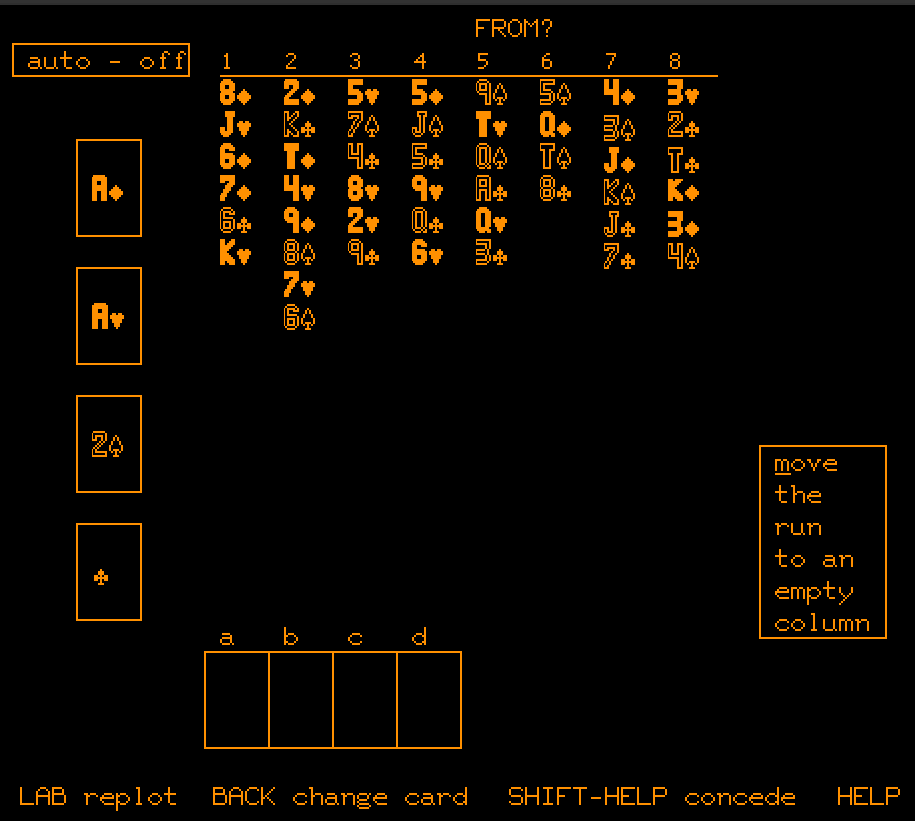
- Paul Alfille's PLATO version changed the build rule to alternating colors, creating the modern FreeCell form.
Paul Alfille and PLATO
Paul Alfille wrote FreeCell for the PLATO computer system in 1978. That mattered because PLATO users could already compare scores, streaks, and variants online, long before Windows made the game a mass-market default.

Jim Horne and Numbered Deals
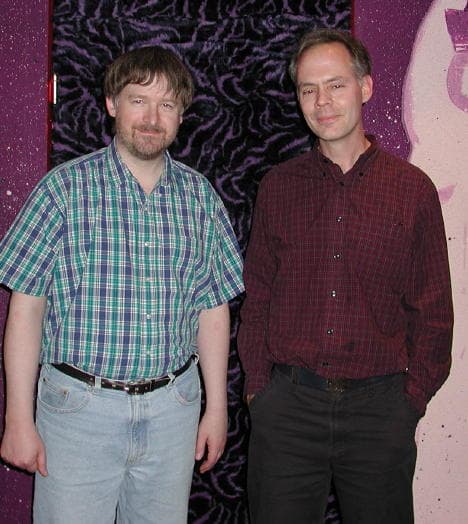
Jim Horne later brought FreeCell into the Microsoft orbit after learning the game through the PLATO community. His Windows implementation, plus the deal-numbering system that let players replay the same layout, helped turn FreeCell into a shared daily challenge instead of a one-off shuffle.
Windows Popularization
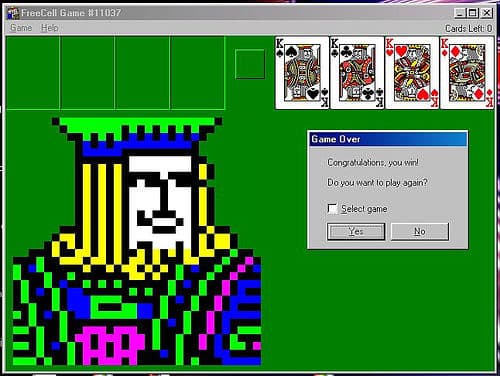
Microsoft bundled FreeCell with its entertainment packs and then with Windows 95, which gave the game enormous reach in homes and offices. The combination of visible cards, numbered deals, and high solvability made it feel fair, replayable, and quietly competitive.
Modern Solver Era
Today FreeCell survives as both a classic patience game and a benchmark puzzle for human and computer solving. CardGamesHub's current numbered catalog reflects that puzzle-first tradition by surfacing curated deals with solver-backed move counts and difficulty buckets.
FreeCell Milestones
| Year | Event |
|---|---|
| 1978 | Paul Alfille writes FreeCell for the PLATO computer system. |
| 1988 | Jim Horne publishes a DOS version after learning the game from the PLATO community. |
| 1992 | FreeCell appears in Microsoft Entertainment Pack Volume 2. |
| 1995 | Windows 95 ships FreeCell to a mass audience. |
| 2001 | Windows XP era releases expand Microsoft's numbered-deal range far beyond the original early sets. |
| 2020s | Browser and mobile collections keep FreeCell popular while solver projects continue studying deal difficulty. |
Want the gameplay framing behind that history? Jump back to About FreeCell or inspect the research ledger in Credits for the source trail.
Authority Links
These references are the strongest starting points for FreeCell's PLATO origins, Windows adoption, and long-running player community.
FreeCell FAQ
These answers mix classic FreeCell rules with the way CardGamesHub exposes numbered deals, difficulty buckets, and best-move references.
Quick Reference
| Topic | Answer |
|---|---|
| Numbered deals on this page | CardGamesHub currently exposes 1,010 curated deals, indexed as Game #1 through Game #1010. |
| Difficulty buckets | 336 easy, 337 medium, and 337 hard deals are currently available. |
| Best label | "Best" is the lowest move count found by the underlying solver data for that deal, not a proof of global optimality. |
| Auto-finish | The game only auto-finishes when the remaining cards can legally move to foundations without further tableau decisions. |
Site-Specific Note
If you replay a numbered deal, you are replaying a curated solver-backed layout, not just asking for another random shuffle.
Need the exact move logic behind these answers? Review the rules or compare the practical advice in the strategy section before retrying a hard board.
Credits and Source Notes
This FreeCell page combines the playable CardGamesHub embed with original editorial sections and source links selected to document both the classic game and this site's current implementation.
Source Ledger
| Source | Used For | Why This Page Cites It |
|---|---|---|
| Play-FreeCell Blog: Who Invented FreeCell | Paul Alfille biography and PLATO-era context | Used as a history reference for the Paul Alfille and PLATO (1978) visuals. |
| Freecell.net: About Freecell and NetCELL | Jim Horne context | Used for Jim Horne background and related historical context. |
| Solitaire FreeCell Blog: History of FreeCell Card Game | Windows-era FreeCell screenshot context | Used as a reference source for the modern/Windows FreeCell game image. |